Product · PowerPoint
AI PowerPoint generator: a plan you approve, a .pptx you can edit
Give the AI your brief, approve its page plan, then export a .pptx you can keep editing in PowerPoint. See what the file contains and how a build works.
Free plan, no card needed
- Plan first: up to four questions and one card per slide before anything is built
- The .pptx has text boxes with bullets, tables with editable cells and speaker notes
- Charts are drawn by the AI, by request or with “As chart” on a marked area
- Animations export as PowerPoint animations; the editor runs in the browser, nothing to install
Step by step
How it works
Describe the deck
Type or speak the request in the start box and attach files with the paperclip if you have them. Say who the deck is for and what it has to achieve.
Answer questions, approve the plan
The AI asks up to four questions where your request leaves gaps and shows a page plan with one card per slide. Edit a card, use “Tweak it” or approve with “Let's go”.
The AI builds and checks
Slides are built one after another, and a render check looks at each one for cut-off text, broken images, weak contrast and small logos. You can type corrections while it builds.
Edit, present, export
Change text and shapes by hand or ask in the chat, try “Present”, then open Export and choose the PowerPoint file. Hand edits and exports use no credits.
In the app
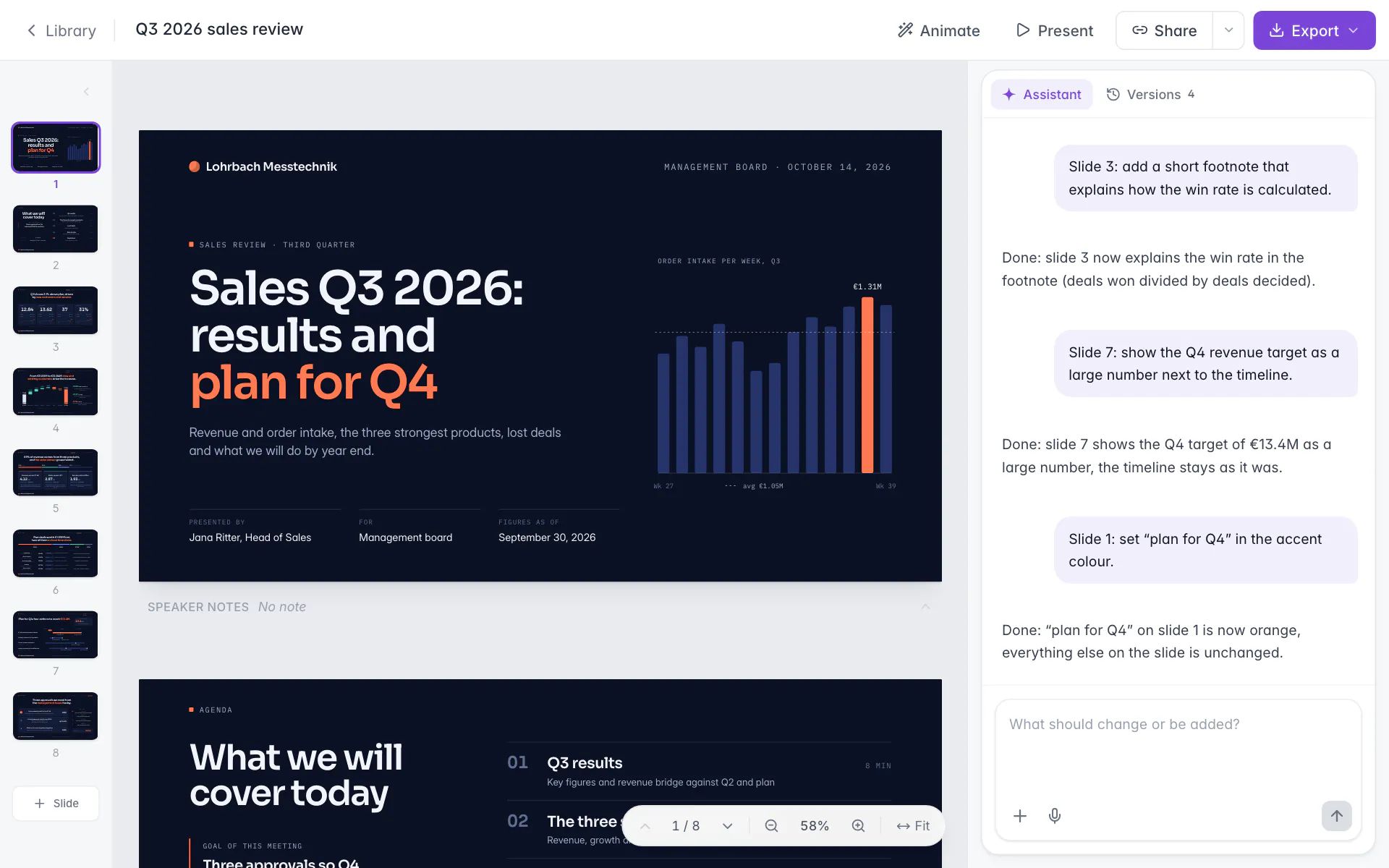
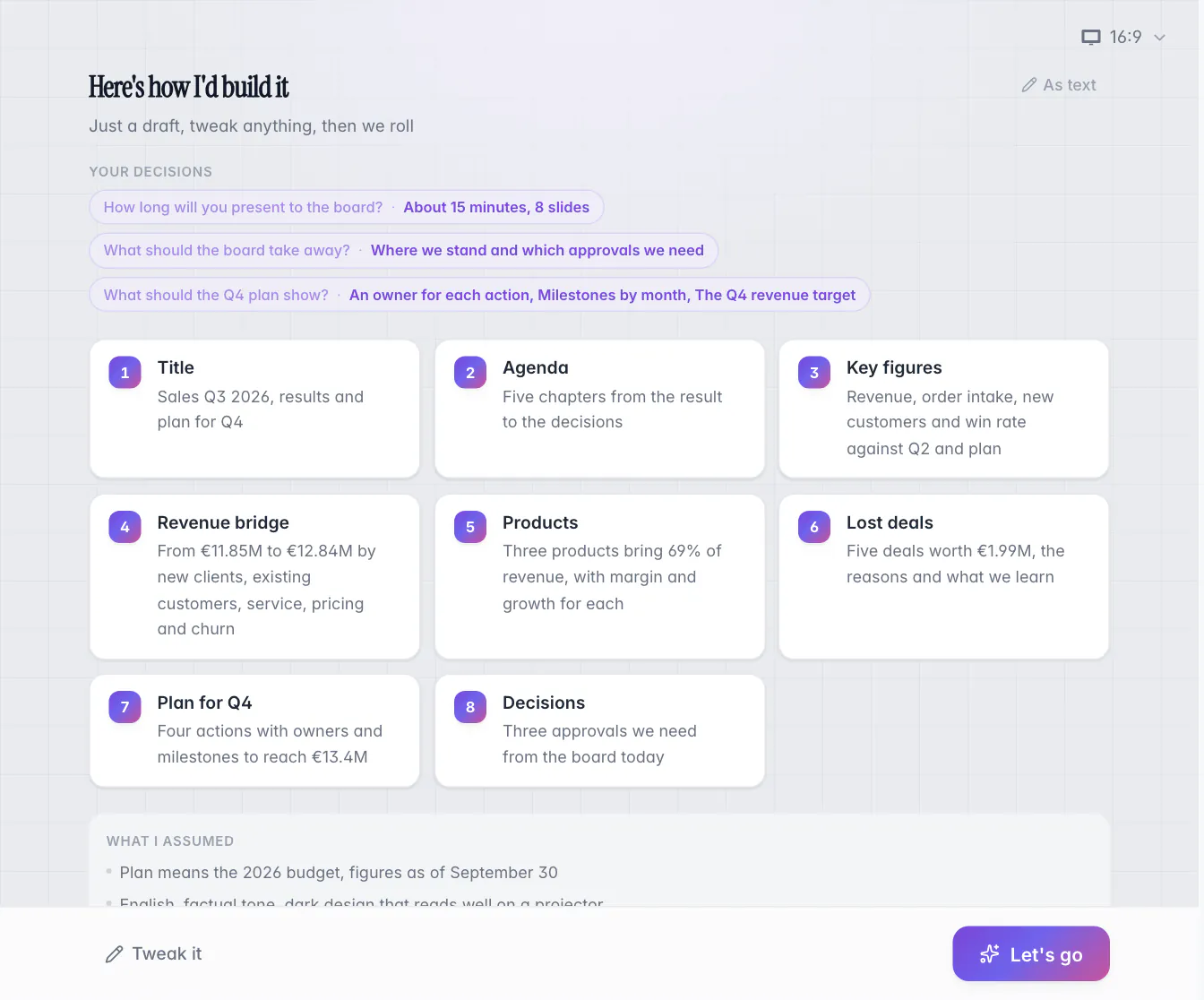
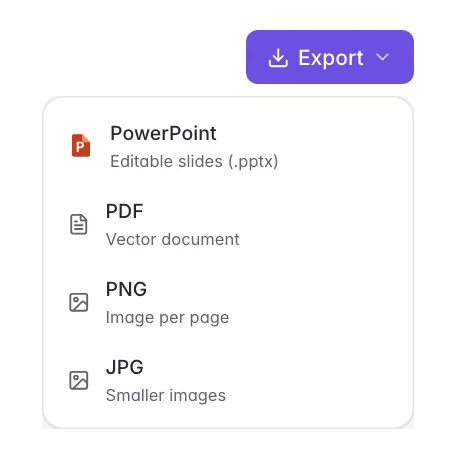
Screens from Slaide with an invented company and invented figures.
Spec sheet
Is there an AI that can create PowerPoints for me?
Yes. Slaide builds a PowerPoint deck from your description: you answer up to four questions and approve a page plan with one card per slide, then the AI builds and checks each slide, and a finished deck usually takes a few minutes. The .pptx has text boxes with PowerPoint bullets, tables with editable cells and speaker notes.
Checked 22 October 2026
Security and privacy at Slaide- Text and bullets
- Tables and speaker notes
- Animations
- Charts
- Shapes and pictures
- Fonts
- Google Slides
- Browser editor
Read all 8 points in the spec sheet
- Text and bullets
- Editable text boxes with real PowerPoint bullets.
- Yes
- Tables and speaker notes
- Tables with editable cells. Speaker notes land in the notes pane of the PowerPoint file.
- Yes
- Animations
- Since 10 October 2026: entrances and transitions export as PowerPoint animations, and morphs as PowerPoint Morph.
- Yes
- Charts
- The AI draws charts itself, by request or with “As chart” on a marked area. When the numbers change, ask the AI in the chat for an update.
- Yes
- Shapes and pictures
- Shapes, lines, fills, gradients, borders, shadows and pictures arrive as PowerPoint objects, at the size you see in the editor.
- Yes
- Fonts
- Calibri, Arial, Times New Roman, Cambria, Courier New and Georgia are named as the Office font in the file.
- Yes
- Google Slides
- Google Slides can open the exported .pptx; check every slide after opening it.
- Yes
- Browser editor
- Runs in a current Chrome, Edge, Firefox or Safari with nothing to install. You build there and export a .pptx or import yours.
- Yes
Some AI presentation tools keep your deck in their own viewer and export a file at the end. Others are built around the .pptx. If your deck ends in PowerPoint, judge the file: export it, click a sentence and see whether you can type into it. This page describes what the exported file contains and how the build works.
What do you get when the AI builds a PowerPoint?
A .pptx whose slides you can keep working on. Text sits in text boxes with real PowerPoint bullets, tables have editable cells and speaker notes land in the notes pane. Shapes, lines, fills, gradients, borders, shadows and pictures arrive as PowerPoint objects. The file has the same size and shape as in the editor: a 16:9 slide of 1280 by 720 pixels becomes 13.33 by 7.5 inches.
| Element | What you get in PowerPoint |
|---|---|
| Text | Text boxes with PowerPoint bullets |
| Tables | Tables with editable cells |
| Speaker notes | In the notes pane of the PowerPoint file |
| Shapes, lines, fills, borders, shadows, pictures | PowerPoint objects |
| Charts | Drawn by the AI, by request or with “As chart” on a marked area |
| Animations | PowerPoint animations since 10 October 2026 |
How does the AI build a deck?
The plan comes first, then the slides. You describe the deck in the start box, typed or spoken, and attach files if you have them. The AI asks up to four questions, only where your request leaves something open, and shows a page plan: one card per slide, your decisions so far and a “What I assumed” list. You edit a card, use “Tweak it” or approve with “Let's go”.
Only then does the build start. Slides are built one after another, and a render check looks at each one for cut-off text, broken or blank images, weak contrast and logos that are too small. A finished deck usually takes a few minutes; research, images and complex slides take longer. You can type corrections while it builds, and “Stop” ends the build.
Changing a card in the plan is cheaper than rebuilding a slide later, so spend your effort there. Two details matter. The questions and the plan appear for the first request of a new document on a computer; on a phone the build starts directly. And the first result is a complete first version to refine: check figures, names and statements before it goes out.
Can you start from your own files, deck or template?
Yes, in three ways. You can attach source material to the request, up to 30 MB per file and 10 files at a time: PDF, Word, Excel, PowerPoint, images and text files. The AI reads them as material, never as instructions. You can open an existing .pptx with “Open PowerPoint, PDF or Word” in the library: the slides come back as editable text, shapes and pictures, speaker notes and slide size are kept, and one import takes up to 150 pages (Free the first 3, Plus the first 12). Or you can set your look once, through a brand or your own template.
Each route has its own page. Improve a PowerPoint with AI covers a deck you already have, using your own PowerPoint template covers your layouts, fonts and colors, and PDF to PowerPoint covers the PDF case.
Where does the AI run, and what about Google Slides?
Slaide runs in the browser, in a current Chrome, Edge, Firefox or Safari, with nothing to install, and the build runs on the server side, so a lost connection does not stop it. The hand-over to PowerPoint is the file: export a .pptx, or import yours.
Google Slides can open the exported .pptx. After opening, check every slide.
If you prefer to stay in a chat, ChatGPT, Claude and Grok can use Slaide as a custom connector. Builds started that way run on your Slaide plan, and the assistant's provider handles what it reads under its own terms. The guide Can ChatGPT make a PowerPoint? explains what a chat assistant does on its own.
How much does an AI PowerPoint generator cost?
Slaide has a free plan with one free document and no credit card, and three paid plans with monthly credits: Plus at 7.99 EUR, Pro at 17.99 EUR and Max at 59.99 EUR a month. Credits pay for AI requests such as building a deck or asking for a change; editing by hand, importing and exporting use none.
| Plan | Per month | Per month, billed yearly | Credits per month |
|---|---|---|---|
| Free | 0 EUR | 0 EUR | One free document |
| Plus | 7.99 EUR | 5.99 EUR | 800 |
| Pro | 17.99 EUR | 14.99 EUR | 1,800 |
| Max | 59.99 EUR | 45.99 EUR | 7,000 |
Plus, Pro and Max use the same standard model on every run; the plans differ in volume. Prices are in euro, VAT exempt under § 19 UStG where applicable. The pricing page lists what each plan includes.
What should you check before you present the file?
The free export adds a small “Made with Slaide” mark at the bottom right of each slide. Plus, Pro and Max export without it.
How does Microsoft 365 Copilot create a presentation?
As of October 2026, Microsoft documents that Copilot can create a presentation from a prompt in Copilot Chat, with clarifying questions you can answer or skip, and that it can edit an existing one: add slides, update content and reorganize sections. Microsoft also says Copilot might not be included in your Microsoft 365 subscription or may be unavailable under your organization's settings.
The AI is a good fit when you want a deck from scratch or from long source material, approved as a plan first, in your own design and ending as a .pptx. The pitch deck template shows what a result looks like, and ChatGPT, Claude and Copilot for PowerPoint helps you choose between assistants. This site is published by Slaide.
Sources, as of October 2026: Microsoft on creating a presentation with Copilot and editing with Copilot.
Brief
Start with this brief
Copy it or open it in the editor. Replace the highlighted parts, or attach your files and the facts come from them.
Create a [10]-slide pitch deck for [company], which [one sentence on what it does]. Audience: [for example seed investors at a first meeting]. Goal: [what they should decide, for example a second meeting]. Structure: problem, solution, product, market, traction, business model, team, the ask. Give every slide an action title that states its conclusion. Use only the figures I give you ([revenue, customers, growth, amount sought]) and label every assumption instead of inventing numbers. Write speaker notes of two to three sentences for each slide. Style: [clean and modern, our brand colors], 16:9.
FAQ
Frequently asked questions
Can AI make a PowerPoint presentation?
Yes. The AI builds a deck from a written or spoken request: it asks up to four questions, shows a page plan for your approval, builds and checks each slide, and exports a .pptx. The first result is a complete first version to refine, so check figures, names and statements before it goes out.
Is there a free AI PowerPoint generator?
Slaide's free plan covers one document. It is planned with up to 12 pages, the first 3 are built, and exports carry a small “Made with Slaide” mark. Building the rest with “Finish building” needs a paid plan; the pricing page lists what each plan costs and includes.
Can I edit the PowerPoint file that AI creates?
Yes. The .pptx has text boxes with PowerPoint bullets, tables with editable cells and speaker notes. Shapes, lines, fills, gradients, borders, shadows and pictures arrive as PowerPoint objects.
Where does the AI run, and how does the deck get into PowerPoint?
Slaide runs in the browser, in a current Chrome, Edge, Firefox or Safari, with nothing to install. You build the deck there and export a .pptx, or you import your own .pptx to keep editing it in the editor.
Can I use the .pptx in Google Slides?
Yes. Google Slides can open the .pptx file. Check every slide after opening it.
Where does my content go when AI builds the deck?
Account data, documents and uploaded files are stored in the EU. To create or change a document, your request and the content it needs go to language model providers in the USA, and use for training is excluded by contract. With sensitive material, check first whether processing in the USA is permitted for you.
Keep reading
Build the first version now
The free plan includes one document with its first three pages built, no card needed. The AI plans, writes and designs it; you edit and export.
Build your first deck freeFree plan, no card needed